Dropped Your Phone in Water? Do This First
The first ten minutes decide whether your phone survives. A six-step water damage response plan, plus four reactions that make it worse.
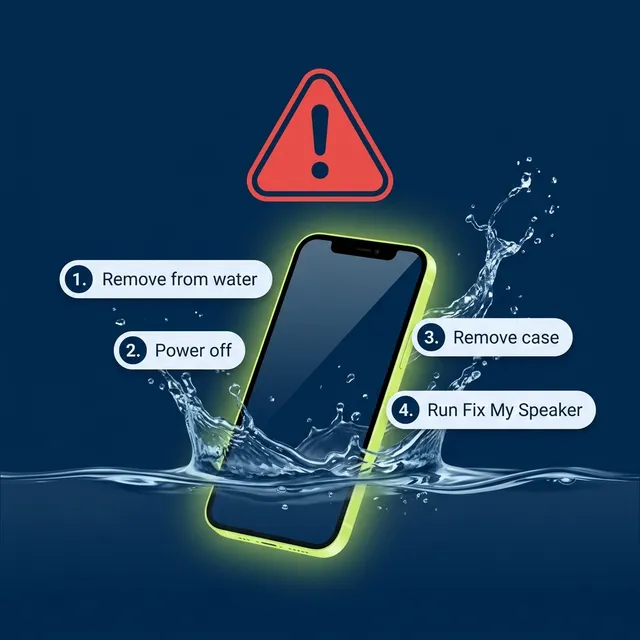
Power the phone off, remove the case, blot it dry, and run acoustic water ejection with the speaker facing the floor. Then leave it upright in moving air for 24 hours without charging. The first ten minutes matter more than everything that follows.
If your phone is wet right now, skip the explanation and do these six things in order. The reasoning is at the bottom.
The first ten minutes
1. Get it out and power it off
Water plus current is what destroys electronics, not water alone. A powered-off phone with water inside it is in a far better position than a powered-on one. Hold the power button and shut it down properly if you can; if the screen is unresponsive, use the force-restart combination for your device and then power off.
Do not press buttons repeatedly to “check if it works.” Every press is an opportunity to pump water further in.
2. Remove the case, and the SIM tray if it is accessible
Cases trap a film of water against the chassis exactly where you least want it. Popping the SIM tray also opens a drainage path and lets air circulate.
3. Dab, do not wipe
Blot every surface with a soft lint-free cloth — a microfibre cloth or a clean t-shirt. Press and lift rather than dragging, because dragging pushes water sideways into grilles, ports and the earpiece slot.
4. Hold it speaker-down and let gravity work
Hold the phone vertically with the charging port and main speaker facing the floor. Give it a few firm downward shakes — not violent, just enough to move standing water out of the port and grille.
5. Run acoustic water ejection
Once the exterior is dry enough to handle, open the water eject tool, set volume to maximum and run a 60-second cycle with the speaker facing down. The main speaker cleaner runs the same cycle alongside the dust modes if you would rather have everything in one place. Repeat up to three times with ten seconds between cycles.
This is the step that actually clears the speaker cavity. Everything before it dealt with surface water.
6. Leave it upright in a dry room for 24 hours
Not in rice. Not with a hair dryer. Standing upright, in normal room air, ideally with a fan moving air past it. If you have silica gel packets, put the phone and the packets in a sealed container together — that genuinely helps with residual internal moisture.
Do not charge it until any liquid-detection warning has cleared and the port is visibly dry.
If you have an iPhone, Apple documents three alert strings — “Charging not available”, “Liquid Detected in USB-C Connector”, and “Liquid detected in Lightning Connector” — and its instruction is the same for all three: disconnect the cable and let the phone dry for up to 24 hours.
The four things that make it worse
Rice. It absorbs ambient humidity from air in a container. It has no path to water already inside the device, it sheds starch into your ports, and it costs you a day of drying time you could have spent doing something effective.
Heat. Hair dryers, radiators, ovens and direct sun all risk warping internal adhesives and the acoustic mesh. Hot air also expands, and expanding air pushes moisture deeper into the device rather than out of it.
Compressed air. A canister blast forces surface water past the grille and into the driver chamber. You convert a problem you could have solved in a minute into one that needs disassembly.
Charging. Applying current across wet contacts is the most common cause of permanent damage after water exposure. Apple states it directly: charging while the connector is wet can corrode the pins on the connector or cable. The alert exists to stop you doing this, and iPhones offer an emergency override specifically so you can ignore good advice. Do not.
You can still charge wirelessly
This is the part almost nobody mentions, and it removes the main reason people override the alert.
Apple’s guidance is explicit: if you have a Qi-certified wireless charger, you can use it while the port dries — just make sure the back of the phone is dry first. A liquid-detection alert does not mean 24 hours without power. It means 24 hours without the cable.
Most Android phones with wireless charging behave the same way, because the restriction is about current across exposed pins, and a wireless coil has none.
Why the first ten minutes matter so much
Two processes start the moment water gets in, and both are time-dependent.
The first is electrochemical corrosion. Water — particularly tap water, seawater and pool water, all of which carry dissolved ions — becomes a weak electrolyte. Where it bridges two contacts at different potentials, metal begins migrating from one to the other. This starts within minutes and is cumulative.
The second is residue deposition. Water evaporates; the things dissolved in it do not. Salt, chlorine compounds, minerals from tap water, sugars from a spilled drink and surfactants from soap all remain behind as a crust once the water is gone. That crust is often what causes lasting muffling — the speaker sounds bad after it dries, not while it is wet.
This is also why “waterproof” phones still suffer. An IP68 rating is tested in fresh water under controlled laboratory conditions, and manufacturers are explicit that the rating degrades as seals age and that liquid damage is not covered by warranty. Seawater and chlorinated pool water are meaningfully harsher than the fresh water used in the test.
If it was salt water or a sugary drink
Rinse the phone briefly under clean, cool fresh water before drying it.
This feels wrong — you are adding water to a water-damaged phone — but it is the right call. Leaving salt or sugar in place guarantees a corrosive, conductive residue once evaporation finishes. A quick fresh-water rinse dilutes and carries most of it away, and then you dry as normal.
What to expect afterwards
If the speaker sounds muffled after drying, work through the seven causes of a muffled speaker — residue in the grille is the most likely and is usually clearable.
If audio crackles at all volumes, or one speaker is silent while the other works, water reached the driver and the damage is likely mechanical — a left/right channel test will confirm which side. At that point a repair centre is the honest answer, and no acoustic tool will change it.
Sources
- Apple Support: If you see a liquid-detection alert on your iPhone
- IEC 60529 — the standard behind IP ratings
Last verified July 2026.
Frequently asked
What should I do first if I drop my phone in water?
Power it off. Water plus current is what destroys electronics, not water alone, and a powered-down phone with water inside is in a far better position than a live one. Then remove the case, blot the surfaces, and run a water ejection cycle.
How long should a wet phone dry before charging?
Around 24 hours, and Apple gives the same figure for iPhones showing a liquid-detection alert. Charging across wet contacts corrodes the connector pins and is the most common cause of permanent damage after a soaking. Wireless charging stays available the whole time if the back of the phone is dry, so the wait costs you the cable rather than the power.
Can I charge my phone wirelessly if the port is wet?
Yes. Apple states you can use a Qi-certified wireless charger while the port dries, provided the back of the phone is dry. The restriction is about current across exposed pins, and a wireless coil has none. Dry the back panel first with a cloth, since a wet surface between the phone and the pad traps moisture against the glass while it charges.
Does putting a phone in rice actually work?
No. Rice absorbs water vapour from air in a sealed container and has no path to liquid already inside a cavity. It also sheds starch dust into ports, and the day or two you spend waiting is time the water spends against metal contacts.
What if my phone fell in the sea or a swimming pool?
Rinse it briefly with clean fresh water before drying. It feels wrong, but salt and chlorine leave a corrosive, conductive residue when the water evaporates. A quick rinse dilutes and carries most of it away. Use cool water and keep it brief — you are diluting the salt, not rinsing the phone out. Then dry and run the ejection cycle as normal.